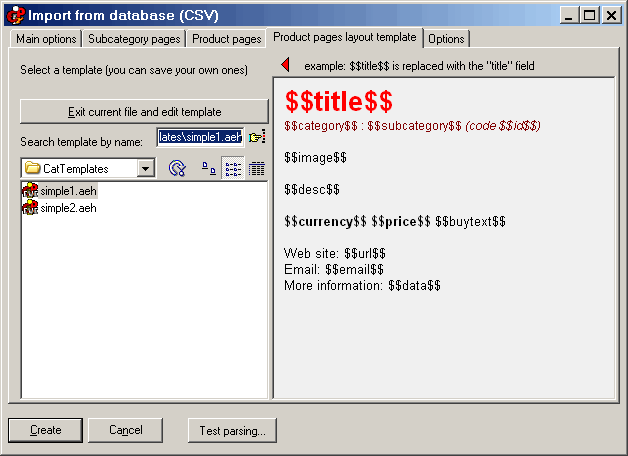
CSV - Database import, “Product pages layout template” tab
Within this tab you can choose a template for the automatically generated product pages. The template is simply a “single page” AEH file saved within a particular folder. Within the text you can insert special symbols such as $$title$$ that will be replaced with the database fields. These symbols are listed on the bottom left of the
first tab.
Click on the image in order to see the other tabs, and for more information.
Some interesting things: the text $$image$$ is replaced with the image. Depending on the settings on the
“Product pages” tab, the image will be the full image, or a scaled image that links to a popup window that will show the large image.
If the CSV contains cart information (short product description, identifier, price), the program can place a buy link ($$buytext$$) or a buy image ($$buyimage$$) that link to the internal cart.
The CSV may also contain a direct “cart URL” that could point to a web script / web cart. This URL may be attached to a buy link or a buy image (see the
”product pages” tab).
You may also use another image, $$auximage$$. This will be always inserted “as is”.
Additional useful fields:
$$contentslink$$ - inserts a link to the main index page
$$catlink$$ - inserts a link to the related category page
$$subcatlink$$ - inserts a link to the related subcategory page
$$gonext$$ - forces the program to load a new record so you may insert more than one product per page (lexicographic order)
Do you have a precise and constructive suggestion on how to improve this page with more clear instructions / detail?
Contact us!
Some other VisualVision professional software programs: