How to create and link pages, 1 
(next >) 
 
This section will show you, using a simple step-by-step procedure, how to create and link pages. 
When you run HyperPublish from the “Start” menu, the software opens the last edited file, or shows a new site / hypertext / catalog document. To create a new hypertext, choose “File >New”. 


As you can see, the toolbars are very similar to MS Word ones. For the moment, just notice that the white cell at the bottom of the window shows the page number, “0”. As HyperPublish manages a whole page set, each page has a name and a number: the name is under the cell (”Untitled”). 
 
Now let’s write a document that points to some different pages. First, we enter some “dummy” text... 


...then we will place a link to the page “Page 1”. This page doesn’t exists, but we don’t need to create it directly (though it is possible, with “File >Add new page...”), as a page creation can be done simultaneously with a link definition.  
Now we will see how. First, let’s select the text block to be linked... 


...then, let’s press the link button in the toolbar (sheet and chain, or “Insert >Link” from the main menu).  
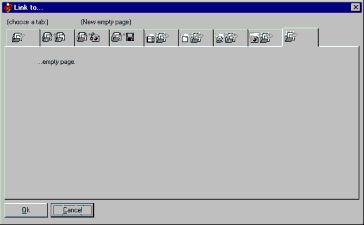
The following window will show: 


In this window HyperPublish lists all pages found in the current site / hypertext / catalog. So, for the moment, we have one page only. As we want to link to a new page (will be “Page 1”), we have to choose the last tab (”link to a new empty page”): 


Let’s press OK. 


What’s happened? HyperPublish has created a new page, the page #1 (as you can see from the white box in the bottom of the window). We can give this page a name, we can select a background, and so on, with “Format >Page properties”.  
 
(next >) 
 
How to create and link pages home 
 
 
Hyper Publish manual, main page - What is HyperPublish? - Quick tour - Search 
Buy / register - Frequent questions / FAQ - Tutorials - Main menu - Get it electronically! - Get it on CD! - User's forum - Contact us - HyperPublish Web site - Visual Vision Website 
 
Creare un sito Web, CDROM, catalogo, manuale, ipertesto Creare CD sito CDROM catalogo, programma per Realizzare CD sito Web aziendale CDROM catalogo, software per Creare pagine Web, programma per Costruire pubblicare pagina Internet,creare sito Web, software per Creare manuali, WinHelp, Html Help, software per Fare un manuale, programma per Creare ebook e-book libri elettronici, software per Risorse software shareware,siti shareware programmi gratis Software: create Website, CD, catalog, ebook, manual, brochure Hypertext authoring create catalogs Website builder software Create your own Website Web Website publishing software cd front end create autorun cd make cd CDROM presentation Ebooks create make build compile E-books Ebook e-book software Ebook editor software visual ebook editor and compiler e-book compiler e-book collection library Crea ebook crear libros electrónicos programa libro electrónico crear ebook libro electrónico programa de e-libro libro electrónico Web page design software Create a Web site Web site design software program Web site editor software build Web site Website software Website builder software Crea tu sitio Web diseñar sitio web diseñar página web programas para el WEB créer vos site  Web professionnel Logiciel de Création de Sites Web Create CD / Web catalog Create hypermedia hypertext CD / Web catalogue catalog Create catalogs CDROM builder software Catalog creator software Create make a CD ROM catalog Create software manual, WinHelp, Html Help Make online manual HTML Help compiler, CHM Create a manual, software software documentation web based help system Create online documentation giochi gratis Shareware software resource, upload, distribute, retail, resellers, magazines, tips DVD video software free games business software  
 
Some other VisualVision professional software programs: 
catalog software HyperPublish: create a product catalog, CD, DVD, a Web Site (also with database CSV import) 
websitebuilder software 1site: create a professional Website, webbuilder software 
create web site EasyWebEditor: build personal Internet pages, create a nice Web site 
create a manual, manual software PaperKiller: create a manual, hypermedia, documentation, help file 
autorun cd brochure CD FrontEnd: build CD menu, autorun CD DVD presentation, brochure, professional CD business card 
ebook software EBooksWriter: create protect ebook, easy e-book software editor and compiler 
 
HyperPublish PRO - Create web sites, CDROMs, DVDs, CDs and Web catalogs catalogues and manuals with ease 
(C) Copyright 1996, 2007 Visual Vision. All rights reserved. 
Since 1996, leader in catalog software and hypertext and hypermedia authoring - ASP members. ESC members.