Internet FTP publishing, 3
Now it's time to sort-out a few technical things for advanced users. Please ignore this section if you are a Web novice.
HyperPublish automatically names all Html files generated. In the Internet it is common to name index.htm the main page of a document (or “home page”). Use “Hypertext >Current hypertext properties” to do this (you can choose any name you want):
You have to check the box “Cover file name (Html)” and to insert the name in the cell on the right.
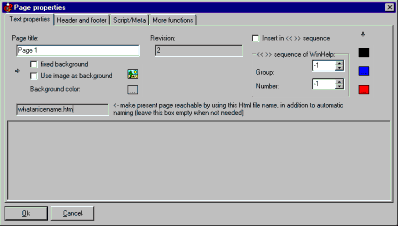
To change the name of other pages, use “Format >Page properties...” (for example whatanicename.htm may be a nice name for Page 1):
You may insert this name in the gray box on the left; this becomes the HTML page name if the proper option is enabled (within the export/ftp Options dialog). Please use this feature only if needed and you know what you are doing. The usual automatic naming is a good choice as it optimizes the file transfer when updating pages with FTP (this is a technical detail: in simple words if you use the automatic naming less bytes/less pages are transferred when publishing, so you save time); it also avoids broken links.
Do you have a precise and constructive suggestion on how to improve this page with more clear instructions / detail?
Contact us!
Some other VisualVision professional software programs: