Internet FTP publishing, 2 
(< previous)  (next >)  
 
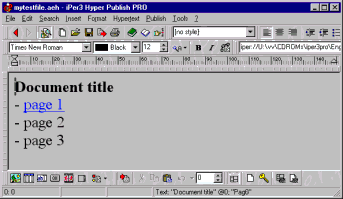
Now let’s see how to publish our site/hypertext. In this example we are using the hypertext created in “Create and link pages” tutorial. 


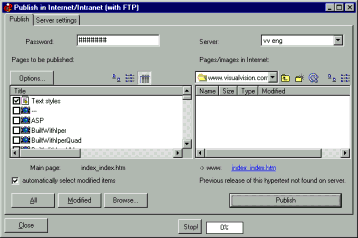
To publish, click on “Publish >Internet - FTP >Publish on the Internet...”. 
The software tries to connect with the last used site (if you’ve not done the FTP setup, it will try to connect with a dummy one, called “default”). 


If you manage different sites, you can choose one from the top right combo box. To set up configuration parameters, use the “Server settings” tab as shown above. When the connection is OK, the directory of the server is listed on the right box. Use the “Stop” button to stop connection tries (you may have to press it twice). 
If the “connection impossible” label appears, you may have used the wrong password, or the wrong parameters. You can correct them using the "Server settings” tab. Or maybe the server is down (in which case you should retry later); or you should disable or configure your firewall. 
 
When you press the “Publish” button, the whole site is published into the selected directory.  
The dialog shows on the left side the HTML/GIF files automatically created by the editor, and on the right the "Initial remote directory" on the server (note that on some servers you should enter a subdirectory before publishing; this has to be configured as "Initial remote directory"; ask to your provider if you are unsure). 
 
Some common problems are: Error 500 (wrong server name; your firewall misconfigured); Error 530 (wrong username and/or password). When no errors but the site doesn't show correctly, it is likely the "Initial remote directory" is wrong. Please email to the Support Staff if you experience difficulties. 
 
EasyWebEditor automatically detects modified pages. So if your site has 100 pages and you just modify ten, then only ten are published. Just after you’re connected, EasyWebEditor does a version control: the modified page items are marked in the left box. You can also manually manage them: only marked items are published by the “Publish” button. The auto-detect can also be disabled. 
 
(< previous)  (next >)  (Get EasyWebEditor >>) 
 
Internet FTP publishing home 


Software: create Website, CD, catalog, ebook, manual, brochure Hypertext authoring software create catalogs Website builder software Create your own Website Web Website publishing software create CDROM cd front end autorun cd create cd business card make cd CDROM presentation populate create cd catalogue from database Crea e-libros elibro crear libros electrónicos programa libro electrónico crear libro electrónico programa de e-libro libro electrónico redactar tu e-libro programa de creación publicacion ebook de libros electrónicos Crea tu sitio Web diseñar sitio web diseñar página web programas para el WEB Ebooks create make build compile E-books Ebook e-book software Ebook editor software visual ebook editor and compiler e-book compiler e-book collection library Web page design software Create a Web site Web site design software program Web site editor software build Web site Website software Website builder software Create CD / Web catalog Create hypermedia hypertext CD / Web catalogue catalog Create catalogs CDROM builder software Catalog creator software Create make a CD ROM catalog Write application manual online software manual Create a manual, software HTML Help compiler, CHM best software security spy antivirus Shareware software resource, upload, distribute, retail, resellers, magazines, tips Commercial, shareware and free software Commercial, shareware and free games download software Crea un catálogo, hypermedia CD, Sitio Web crear un sitio Web profesional crea páginas Web personales, para el Internet crear manuales y archivos crea los CD autorun (auto-iniciantes) presentaciones folletos crear publicar ebook elibro libros electrónicos créer un catalogue, hypermedia CD, site Web créer vos site  Web professionnel Logiciel de Création de Sites Web créer fichiers d'Aide Windows et HTML, manuels créer présentation, brochure, CD démarrage automatique Logiciel pour l'édition de livres électroniques ebook Programma ebook Creare ebook Programma libro elettronico Creare libro elettronico software per creare ebook libri elettronici Programma catalogo Creare catalogo Programma cataloghi Creare cataloghi CD Web Creare CD, cataloghi, siti Web, ipertesti CD cataloghi catalogo con import database creare cataloghi, cd, cdrom, siti Web Programma sito Web Creare sito Web Programma siti Web sito aziendale Programma siti Web Creare siti Creare sito personale creare pagine web creare depliant presentazione biglietto da visita su CD autoplay autorun autoavviante Programma CD Creare CD, presentazioni Programma presentazione Creare CD autoplay Creare CD autoavviante Programma manuali HTML Help Creare Html Help Programma CHM Creare CHM Programma manuale creare manuali, ipertesti, documentazione  
 
(C) Copyright 1999, 2005 Visual Vision. All rights reserved.