Internet FTP publishing, 3 (and common problems / errors)
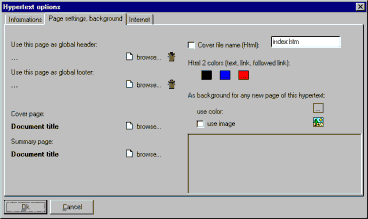
Now it's time to sort-out a few technical things. EasyWebEditor automatically names all Html files generated. In the Internet it is common to name the main page (or “home page”) of a document index.htm . Use “Hypertext >Current hypertext properties”, second tab, to eventually change this (you can choose any name you want):
You should check the box next to “Cover file name (Html)” and insert the name in the cell on the right.
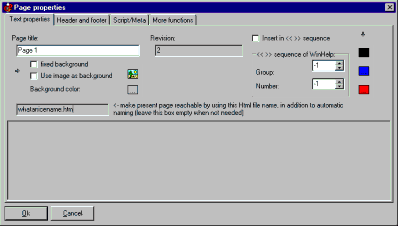
To change the name of other pages, use “Format >Page properties...” (for example whatanicename.htm may be a nice name for Page 1):
You should insert this name in the gray box on the left. Please use this feature only when needed and not for the home page (for the home page, use Hypertext >Current hypertext properties, then the second tab). The usual automatic naming is a good choice as it optimizes the file transfer when updating pages with FTP (Sorry! This is a technical detail: but, in simple words if you use the automatic naming fewer bytes/fewer pages are transferred when publishing, so you save time).
Please notice that unless you enable the setting "file html / no auto" within the "Options" dialog (Options button, on the top left within the FTP publishing dialog) only a redirection file is created. If you enable "file html / no auto" the name in the gray box will be the actual HTML file name for the page.
So you have now successfully published your Website on the Internet!
Common Internet FTP publishing problems / errors / mistakes
From the support history, we know that 100% of the Internet publishing faults are due to mistakes (either by the user or by the hosting service).
Here the common errors.
Error 500
- wrong or incorrectly typed ftp server name (= host, server, ftpserver); Solution = check, retype, ask
your host. Usually the format of the name to be inserted is yourserver.com or ftp.yourserver.com
- your firewall or antivirus or antispyware software is misconfigured; Solution = disable or better configure
- problems with the Internet connection or the ISP or the
host; Solution = check the hardware, call ISP, call the host;
Error 530
- wrong username (=user, identifier, userid, login) and/or password; Solution = check, retype, ask your
hosting provider;
- maybe the host did inadvertently reset the parameters; Solution = ask your
hosting service.
- username and password are ok but the ftpserver (host) is KO, so you are actually attempting to connect to another server with a similar name; Solution = check, retype;
Error 550 or some other numbers or Access Denied
- it is likely the "Initial remote directory" is wrong
usually the initial remote directory should be set as the "web" folder, that is the folder that will be shown on the web. You may see a lot of folder, but only one may be enabled for the Web.
Solution = check the parameters provided by your host; or try to guess the parameter; or ask your host;
Typical values are:
/
or
/www
/web
/public_html
/htdocs
/var/www/html
No errors but the site doesn't show correctly
- it is likely the "Initial remote directory" is wrong,
Solution = see above the instructions for error 550
- there are problems with pre-existing content. The existing content (if initial remote directory is OK) is shown on the right side of the publishing dialog. You may delete it: select then press the DEL key on the keyboard
The publishing process interrupts or Error 331 or some other numbers or stalls
- it is likely your server is experiencing a temporary overload. Just press the moving "Stop!" button and wait until it stops. Then press the big "Publish" button and it will continue the publishing (without restarting). If this error persists, try to connect with another ISP / carrier, or try at another time of the day, or... find a less cheap hosting service!
The trial sometimes forgets the parameters or is annoying
- this is a limitation of the trial. Please
purchase.
|
Other good VisualVision software:
EasyWebEditor the productive web site builder is available also in other languages:
|